Project Overview
This repository set provides a ROS 2 underwater vehicle-manipulator system centered on a BlueROV form-factor floating base and a Reach Alpha manipulator. It is designed to run the same high-level procedures across simulation, mixed hardware/simulation, and hardware-in-the-loop experiments.
The stack is split across two main runtime packages:
uvms-simulatorprovides the exported ROS packageros2_control_blue_reach_5. It contains the launch system, xacro/URDF robot descriptions, ros2_control hardware interfaces, reset/dynamics services, camera drivers, controller-manager configuration, and dependency workspace metadata.uvms-simlabprovides the exported ROS packagesimlab. It contains the interactive RViz runtime, controller implementations, planner action server/client, replay profiles, experiment logging, joystick interfaces, and perception-facing visualization utilities.
Read the stack as one UVMS project: uvms-simulator owns the system
description and hardware/simulator interfaces, uvms-simlab owns the
experiment/runtime behavior, and the generated dynamics sources provide the
models used by the simulator and model-based controllers.
Architecture
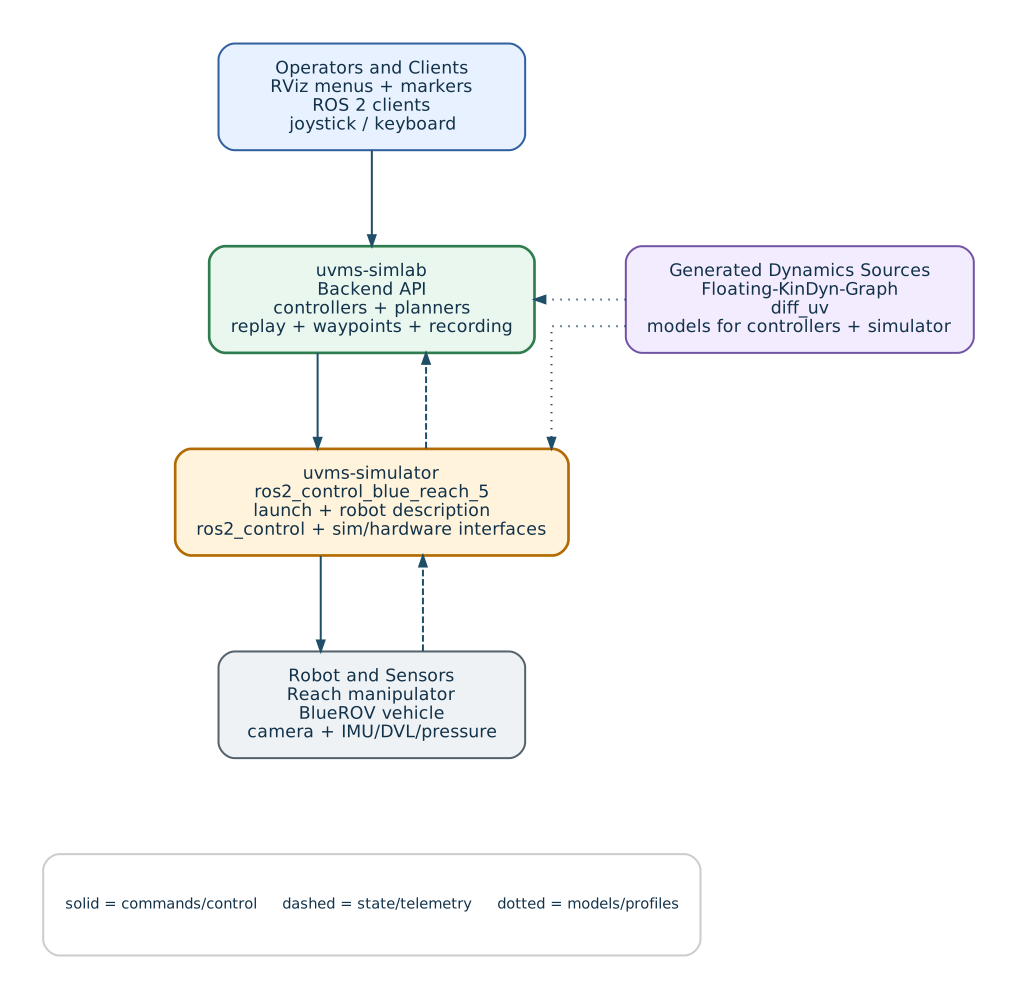
System Layers
Robot description and launch:
uvms-simulatordefines the UVMS model, hardware/sim selection, controller configuration, and launch-time runtime options.Hardware interfaces: real and simulated manipulator/vehicle interfaces expose the same command/state surfaces through ros2_control.
Runtime control:
uvms-simlabselects behaviors, controllers, planners, replay profiles, grasper commands, and visualization through RViz and joystick inputs.Experiment infrastructure: command replay, reset/dynamics metadata, replay session logging, and rosbag2 MCAP recording support repeatable simulator and hardware experiments.
Environment/perception: bathymetry/workspace visualization, collision context, real camera drivers, and simulated camera rendering support planning and operator feedback.
Guide Map
Installation and Build: install dependencies, build the workspace, build docs, and deploy the Sphinx site.
Tutorial: first simulated launch after the workspace is built.
Hardware-in-the-Loop Setup: hardware-specific setup notes.
Services, Actions, and Topics: runtime services, actions, topics, and inspection commands.
Controls, Menus, and Teleoperation: RViz menus, task modes, joystick behavior, and controller/replay separation.
Command Replay and Experiments: command replay profiles, reset behavior, repeats, and replay-session logging.
Sensors and Perception: sensors, perception-facing camera streams, and mount/light commands.
Developer Guide: developer guide for adding controllers, planners, and robot interfaces.
Core Runtime Nodes
interactive_controller: RViz interactive markers plus the shared SimLab backend API for controller switching, path planning, waypoint execution, grasper commands, reset management, and command replay orchestration.planner_action_server_node: OMPL-backed path-planning action server used by the interactive controller.bag_recorder_node: rosbag2 MCAP recording for simulator and hardware sessions.collision_contact_nodeandvoxelviz_node: opt-in environment visualization and collision/context debug tools. Enable them withlaunch_collision_contact:=trueorlaunch_voxelviz:=true.
Launch Modes
The main launch file is provided by uvms-simulator. The task:=...
argument selects the runtime mode:
ros2 launch ros2_control_blue_reach_5 robot_system_multi_interface.launch.py task:=interactive
Supported launch tasks:
interactive: RViz interactive-marker operation with planning, replay, reset manager, grasper commands, overlays, and SimLab runtime nodes.manual: PS4 joystick teleoperation throughjoystick_controller.joint: custom joint-space command node entry point.direct_thrusters: keyboard PWM channel control throughdirect_thruster_controller.
The operator guides focus on interactive, manual, and
direct_thrusters. The joint task is primarily a developer entry point
for custom joint-space command experiments.
Useful launch switches:
use_manipulator_hardware:=true: use real Reach Alpha hardware.use_vehicle_hardware:=true: use the vehicle hardware interface.sim_robot_count:=N: spawn N simulated UVMS robots.record_data:=true: start rosbag2 MCAP recording.gui:=false: disable GUI applications, including RViz, RViz overlays, and PlotJuggler.launch_rviz:=false: disable only RViz and RViz overlays.launch_camera:=auto|true|false: enable or disable camera nodes.cleanup_stale_nodes:=true|false: pre-launch cleanup for stale simulator nodes and diagnostictf2_echoprocesses left by interrupted sessions. This is enabled by default.launch_collision_contact:=true|false: enable the FCL contact/clearance visualization node. It is disabled by default.launch_voxelviz:=true|false: enable the bathymetry voxel cloud visualization node. It is disabled by default.interactive_fcl_update_rate:=Hz: backend FCL refresh rate used by interactive collision-aware helpers. Set0to disable periodic refresh.camera_source:=auto|sim|real: select whether/alphacomes from the simulated renderer, the real GStreamer camera node, or automatic mixed real/sim camera selection.sim_camera_renderer_backend:=pyvista|open3d: choose the simulated camera renderer backend.pyvistais the default.sim_camera_render_all_cameras:=true|false: render every simulated robot camera, or only the selected feed.sim_camera_underwater_effect:=true|false: enable or disable the simulated underwater tint/haze applied below the water surface.sim_camera_underwater_haze,sim_camera_underwater_tint,sim_camera_underwater_blur,sim_camera_underwater_noise, andsim_camera_underwater_vignette: tune the underwater profile at launch or at runtime withros2 param set /sim_camera_renderer_node ....
Dynamic Obstacles and Replanning
Dynamic obstacles are owned by the selected SimLab behavior source and can run
without RViz. Frontends author pose, size, and geometry through
/dynamic_obstacle_sim_node/edit_dynamic_obstacles; no active path is required.
World profiles live in uvms-simlab/resource/world_profiles and are applied
through the same edit service using replace. Replanning selection is separate
from obstacle behavior selection.
Dynamic replanning is configured through the same world service, not launch arguments. When enabled, each robot monitors timed trajectory previews against the shared dynamic-obstacle world. Replanning runs while motion continues only when braking and predicted clearance checks allow it. Unsafe execution is held with feedback, preserving the goal and waypoint progress. In simulation, the supervisor retries the retained goal once the vehicle has settled and clearance is restored. Hardware does not resume automatically. There is no automatic retreat from inside the clearance margin; checks are sampled, not continuous.
Command Replay
Command replay profiles live in uvms-simlab/resource/playback_profile. Replay
uses the Cmd Replay menu. Select CmdReplay, choose a profile, then run
reset/play. Profile details are covered in Command Replay and Experiments.
Controller Modes
The default controller is selected at startup but remains inactive until the user
explicitly activates a behavior. Plan & Execute activates the selected
feedback controller on demand. CmdReplay remains isolated from planner
execution.
Dynamics Provenance
The generated dynamics functions used by the stack come from two companion projects:
Floating-KinDyn-Graph: URDF-based fixed- and floating-base serial-manipulator modeling. It generates CasADi graphs for kinematics, Jacobians, Lagrangian dynamics, energy terms, payload/friction effects, identification regressors, and controller utilities.
diff_uv: differentiable 6-DOF underwater-vehicle dynamics based on Fossen marine craft models, including body/NED/quaternion kinematics, forward and inverse dynamics, hydrodynamic terms, restoring forces, system-identification utilities, EKF utilities, nonlinear PID helpers, and CasADi code generation.
Capability Map
Multi-robot simulated UVMS bringup.
Real/sim manipulator and vehicle mixing through launch arguments.
Shared ros2_control command/state interfaces for simulator and hardware.
Simulator reset/release and typed robot dynamics services.
Hydrostatic-compensated feedback, computed-torque/inverse-dynamics control, and extensible controller paths.
OMPL vehicle planning through an action server.
RViz interactive marker target selection.
Vehicle waypoint queues and waypoint execution.
Whole-body and joint-space control modes.
PS4 joystick teleoperation.
Direct thruster PWM keyboard testing.
Command replay from CSV profiles with reset/dynamics metadata.
Optional replay-session CSV logging.
Camera launch, real camera mode, and simulated camera renderer mode.
Bathymetry/workspace visualization and collision context.